Main Screen
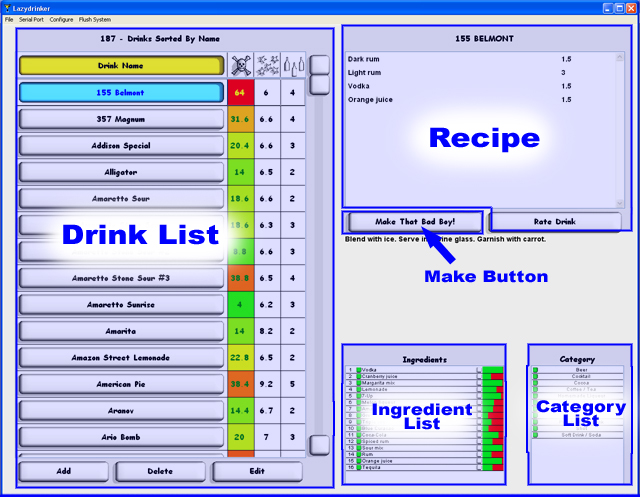
The main screen is comprised of six areas...Drink List, Recipe, Make Button, Ingredient List, Category List, and Menu Bar. here is a short description of each followed by a more detailed explanation.
| Drink List - | This is where you can sort and browse through the list of drinks that you can make. |
| Recipe - | This list shows what is in the currently selected drink. You may also rate the drink by clicking the 'Rate Drink' button. |
| Make Button - | When you decide what drink you want you can either click this button or press the 'Enter' key. |
| Ingredient List - | The ingredients you have in your Lazydrinker are shown here as well as their levels and filter settings. |
| Category List - | All drinks fall under a certain category and here you can filter out certain categories. Turning off 'Shots' for example would filter the drink list to display all drinks that aren't shots. |
| Menu Items - | The menu items allow you to exit the program, search for a Lazydrinker connected to your PC, Configure your font sizes, and run a flush sequence. |
| <<<Help |
| Home | Support | Screenshots | Software | Movies | Purchase |